
Let your AI agent take the screenshot.
Screen Capture runs a local MCP server, so Claude Code, Claude Desktop, Cursor or VS Code can capture your screen, read its text, build and run a flow, or lay out a carousel and export it as a PDF. All on your machine. Off by default, loopback only, and every request needs a token. And for scripts, there is a command line.

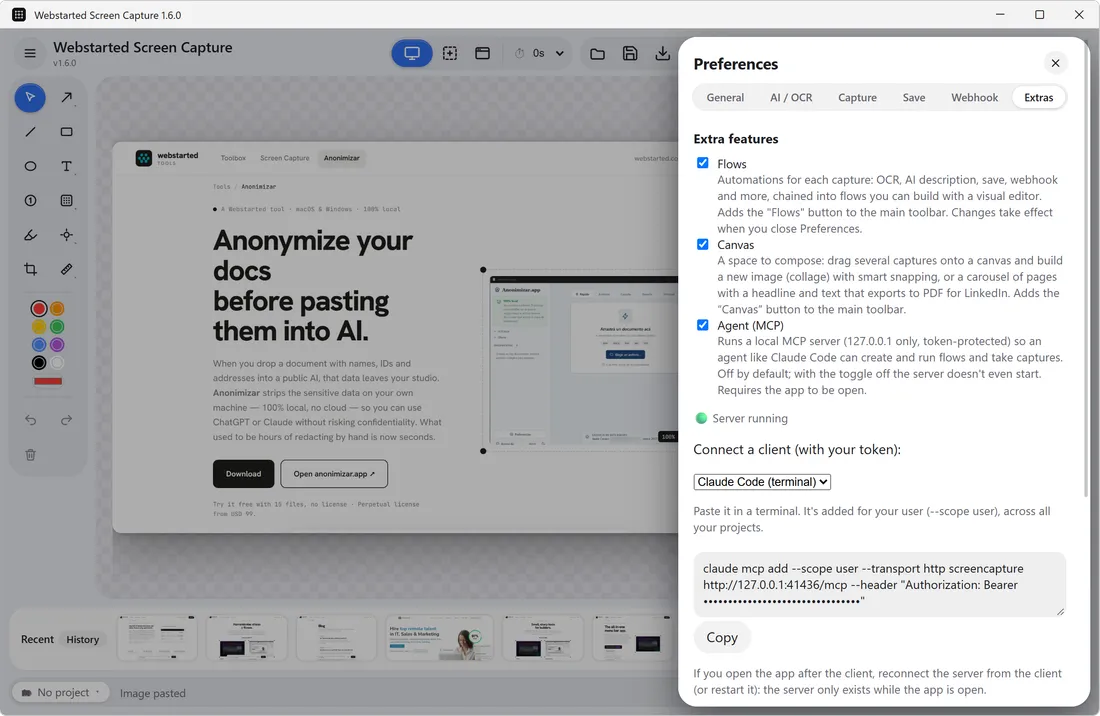
Capture, read, automate, lay out.
The core tools (capture and flows) are plain tools with their own argument schemas, so the client checks the arguments before they arrive. The Canvas, an extra, enters as a single tool with verbs, so it costs no context in a session that never uses it.
Capturing takes the primary monitor, headless, with no overlay. Images go back to the
agent only when it asks (include_image), at most 1568 px wide, because
an image costs thousands of tokens per turn.
Describe the flow. The agent builds it.
The main use is creating flows by talking to an agent. It reads the catalog of steps, writes the flow and saves it, and that save goes through the same validation and the same file as the visual editor. A wrong step type, variable or field is rejected with a clear message.
Running a flow is asynchronous: the agent queues it on a capture and gets a run id right away, then checks its status, because a step can take minutes. When a name matches more than one flow, the tool refuses and lists the candidates instead of guessing, and deleting needs the exact name or id.
The Canvas, from idea to PDF. The agent sends the whole carousel in one call (pages, layout templates, text and captures by reference), gets warnings when a title did not fit, and exports the PDF. The export opens no dialog and never overwrites an existing file unless asked to. Or it leaves the deck open in the Canvas for you.
- Same validation and storage as the visual editor
- Ambiguous names are refused, never guessed
- A carousel in three calls: catalog, create, export
One command, or one block of JSON.
Turn the server on in Preferences → Extras → Agent. It generates a token and shows both ways to connect, already filled in: a terminal command for Claude Code and a config block for Claude Desktop, Cursor or VS Code.
The transport is HTTP over loopback, so there is nothing to install next to it. Regenerate token cuts off every client that had the old one.
- Works with Claude Code, Claude Desktop, Cursor and VS Code
- Port 41436, so it lives next to the Toolbox MCP server (41434)
- The app has to be running: the server answers from inside it
claude mcp add --transport http screencapture \
  http://127.0.0.1:41436/mcp \
  --header "Authorization: Bearer <token>"
{
  "mcpServers": {
    "screencapture": {
      "type": "http",
      "url": "http://127.0.0.1:41436/mcp",
      "headers": {
        "Authorization": "Bearer <token>"
      }
    }
  }
} A local port is still a port.
The switch is off by default, and off means the server never starts. On, it binds only 127.0.0.1, never your local network, and every request must carry the bearer token, compared in constant time.
A Host and Origin check runs before the token, against DNS rebinding: a web
page that points a domain it controls at your loopback address is refused. Request
bodies are capped at 256 KB, and anything that is not a POST to /mcp
with the token is rejected.
What a flow can touch. A flow saved by the agent that sends data out or writes to disk stays switched off until you turn it on. Flows cannot write executable or hidden files, and folders and export paths must be local: network paths are refused.
Where the token lives, honestly. In plain text in the app’s settings file, the same model the GitHub, npm and AWS command-line tools use. It guards a loopback port, and anyone who can read that file is already running code as you.
A screenshot or its text, from any script.
Called with a command, Screen Capture captures the primary monitor, prints the text or writes the PNG, and exits without opening a window, whether the app is open or not. Anything that can run a command and read its output can use it: macOS Shortcuts, Power Automate Desktop, Raycast, Task Scheduler or a shell script.
There is no symbol in your PATH yet: you call the executable inside the
app. On a Mac that is
/Applications/Webstarted Screen Capture.app/Contents/MacOS/Webstarted Screen Capture,
and an alias makes it short. On Windows it is the installed .exe.
- macOS Shortcuts: a Run Shell Script action with
capture --ocr; its output is the text, ready for the next action - Power Automate Desktop: run the
.exewithcapture --ocrand read the standard output - On Windows, the shell does not wait for the app: use
start /waitin cmd, pipe the output in PowerShell, and save the PNG with--out(in PowerShell 5,>corrupts the image)
capture [--ocr] [--out <path>]
  --ocr          print the recognized text
  --out <path>   save the PNG there
                 (neither: PNG to stdout)
--help, -h       help
--version, -V version alias wsc='"/Applications/Webstarted Screen Capture.app/Contents/MacOS/Webstarted Screen Capture"' wsc capture --ocr wsc capture --out ~/shot.png
Questions, answered.
What is MCP?
The Model Context Protocol is a standard way for an AI client (Claude Code, Claude Desktop, Cursor, VS Code) to discover and call tools that live outside it. Screen Capture implements the server side, so capturing, reading text, flows and the Canvas become tools the model can use.
Is it on by default?
No. It stays off until you turn it on in Preferences, Extras tab, and with the switch off the server does not even start listening.
Can the agent capture my screen whenever it wants?
While the server is on and the app is running, a connected client that has the token can call capture and get a screenshot of the primary monitor. That is exactly why it is off by default, listens only on 127.0.0.1 and asks for the token on every request. Turn it off, or regenerate the token, and that access is gone.
Can the agent send my captures somewhere without me knowing?
Not on its own. If the agent saves a flow that sends data out or writes to disk (a webhook, opening a URL, saving or appending to a file, or Ollama on another host), the flow is saved switched off and the agent is told to ask you. The flow tools refuse to run an inactive flow, so you are the one who turns it on.
Do I need Pro?
Yes. You turn the server on in the Extras tab of Preferences, which is part of Screen Capture Pro, and the same goes for flows and the Canvas. If you remove the license, the server turns off. The command line does not need it.
Is it in the Mac App Store edition?
No. The MCP server, flows and the Canvas come with the direct download and the Microsoft Store edition, not with the Mac App Store one.
Can I run it next to the Toolbox MCP server?
Yes. Screen Capture listens on port 41436 and Webstarted Toolbox on 41434, so both servers can be on at the same time on the same computer.

Get Webstarted Screen Capture
The MCP server and the command line come with the direct download and the Microsoft Store edition. macOS 12+ (Apple Silicon) and Windows 10+.