
A presentation timer that knows your script, not just the clock.
Load your sections with their minutes and, instead of a bare stopwatch, it tells you whether you are on time, ahead or behind — with previous, current and next always in sight. Press Start and it moves to a corner above your slides. Jot down what comes up while you speak, and the summary is waiting when you finish.
Already have Toolbox? Open this widget
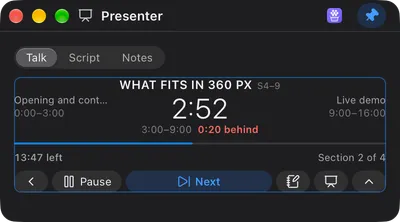
Two numbers, and the second one is the product.
The first is how much is left in the section you are in. The second is how far you are from your own plan — behind, ahead or on time. “Nine minutes left” tells you nothing on its own; “1:18 behind and the demo is still coming” tells you to cut the anecdote.
Previous, current and next are always on screen, because a timer is not a map. Knowing that Wrap up is what follows changes what you do with the ninety seconds you just lost. The traffic light works on the section, not the talk: amber with five minutes to go, red with two, and it keeps counting once you are over rather than freezing at zero.
- Sections with their minutes, reorderable, with the planned total
- Rescale: the same talk in 12 minutes, proportions intact
- Pause and resume; the arrows move between sections
- The arrows never end the talk — finishing stays a deliberate click
Start closes Toolbox and sends the talk to a corner.
A menu bar popover closes as soon as it loses focus — and losing focus is the first thing that happens when you switch to your deck. So Start does two things: it runs the clock and it moves the talk into a small window pinned to the top right, above everything, including a full-screen presentation. You get it back into the popover whenever you want.
With the clock focused the keyboard is enough: Space pauses, the arrows switch section, N adds a note and C shrinks the whole thing to one line for when you want the screen almost clean. Being honest about the edges: the corner is fixed to the top right for now, a global shortcut is not possible for a widget — the OS-level hotkey belongs to the app shell — and there is no menu bar clock, because that would be macOS-only.
What you promised on stage, with the minute it happened.
Someone asks a question you cannot answer now. You promise to send a link. You notice a slide that lies. Those three things arrive while you are talking and all three are gone twenty minutes later. One key, one line, Enter — and each note keeps its minute, its section and its type: Question, Promised, Fix or Add to deck.
When you press Finish it writes the debrief for you: planned versus actual per section, plus every note, copyable as Markdown in one button. That is the part a stopwatch can never give you — the evidence that the demo always takes twelve minutes and not eight.
The phone counts up. It does not know your demo is next.
The usual setup is a phone face-up on the lectern, or the presenter view of your deck. Both give you elapsed time and one of them takes a screen you may need. Neither knows what you planned, so the arithmetic — how much of my plan is left, against how much talk is left — is something you do in your head, out loud, in front of people.
This does that arithmetic and shows it as a sentence. It is also honest about what it does not do: it will not drive your slides, it does not run on your phone, and it does not replace the presenter view — it sits above it.
- Ahead or behind against your plan, not just elapsed
- Stays visible over a full-screen deck
- Notes with the minute, and a summary at the end
- Where it stops: no slide control, no phone app, no sounds
Installed from the catalog, in one click.
Presenter is not bundled into the app — it is a widget in the Webstarted Toolbox catalog. Download Toolbox, open the catalog tab (🧰), press the “+” next to it, and it lands in your Focus tab. No reinstall, no app update. The rest of the talk kit lives next door:
Questions, answered.
How is this different from a stopwatch?
A stopwatch tells you how much time has passed. This tells you whether you are going to make it. You load your sections with their minutes — intro 3, demo 8, wrap up 4 — and from then on the number that matters is the difference against your own plan: “4 minutes behind and you still have the demo”. That sentence is the product. “Nine minutes elapsed” is not actionable while a room is looking at you.
Where does it sit while I present?
When you press Start, Toolbox gets out of your way by itself: the popover closes and the talk moves to the top right corner of the screen, above everything, including full-screen slides. That is not a nice extra — a popover closes the moment it loses focus, which is exactly what happens when you switch to your deck, so without this the timer would vanish at the worst possible time. The corner is fixed for now; choosing it from the UI is not built yet.
Does it make any sound?
No, on purpose. You are on stage: a chime at minute seven is worse than being late. Every warning is visual — the numbers turn amber with five minutes left in the section, red with two, and keep counting once you are over. Nothing beeps, nothing pops up, nothing takes your screen.
Can it advance my slides?
No, and that is a decision rather than a gap. Driving a deck needs a native capability, a permission prompt and an adapter per application, and it would compete with a clicker that already works and that you already own. This is the clock and the notebook; the slides stay yours.
What if the talk gets cut to twelve minutes?
Rescale it: type the new total and it splits the minutes across your sections without changing the proportions, so a script written for 25 becomes the same talk in 12. If the number does not fit, it tells you the minimum those sections allow instead of silently rounding everything to zero.
How do the notes work?
One key, one line, Enter. Each note keeps the minute of the talk and the section it happened in, plus a type: a question from the room, something you promised to send, something to fix, or an improvement for the deck. That typing is what makes the notes useful afterwards — “promised” and “fix” are two different to-do lists, and separating them at 3 seconds of effort beats reconstructing them later from memory.
What do I get when I finish?
The summary writes itself: how long each section actually took against what you planned, plus every note, ready to copy as Markdown in one button. It is the honest debrief of the talk — where you always overrun, which section you keep cutting — and it is the reason to plan the next one differently.
Does it work in a private session?
No, and the widget declares it rather than pretending: the corner window it uses points at the persistent widget, so starting a talk from a private session would put your normal profile on screen. Supporting it properly needs the corner to act on the window that asked for it, which is not built. Everything else — script, run, notes, summary — works the same in a normal session.
Is it free?
Yes. Webstarted Toolbox is free and needs no account, and Presenter is a free widget in its catalog — one click from inside the app installs it, with no app update needed.

Get Webstarted Toolbox
Free to use. Download the app, then add Presenter from the catalog in one click. macOS 12+ and Windows 10+.
One icon, many small tools
This is one of the 43 widgets in Webstarted Toolbox, the free all-in-one menu bar app for Mac and Windows. Here are the rest: