
Built into Webstarted Toolbox, the all-in-one menu bar app · macOS & Windows

A timer you drag, not type.

Set it by dragging two rings, hours inside and minutes outside, and hit play. When time is up it tells you the way you chose: a soft chime, a sound that loops until you see it, or a card in the middle of the screen you cannot miss.
Free · No account · macOS 12+ & Windows 10+
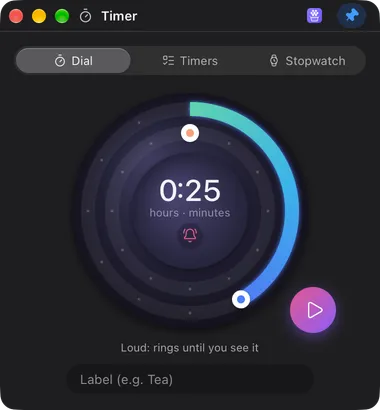
The Timer widget's ring dial set to 25 minutes, with the bell for the alert type in the middle and a play button
Ring dialHours in, minutes out
3 alertsSoft, loud, blocking
Up to 10 timersEach with a label
StopwatchWith laps
The dial

Drag the rings, like turning a knob.

The inner ring is the hours and the outer ring is the minutes. Drag slowly and it stops on any minute, with a little pull toward 5, 10 and 15; drag fast and it jumps in fives. Go past 12 on the minutes and it adds an hour, like the crown of a watch.

While it runs, the same dial shows what is left: the original time as a faint dotted ring and the remaining time shrinking on top of it.
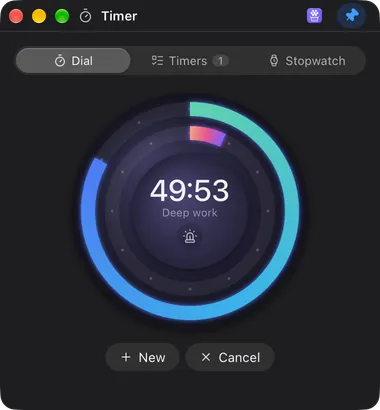
The dial running a Deep work timer with 49 minutes 53 seconds left, the remaining time shrinking over the original ring
Three kinds of alert

Choose how hard it should insist.

Tap the bell in the middle of the dial to pick the alert for that timer:

  • Soft: one chime and a notification. For a tea or a short break.
  • Loud (the default): the sound loops until you see it.
  • Blocking: a card in the middle of the screen and the sound loops until you accept it. For the meeting you cannot be late to.

In presentation mode the blocking card steps down to a loud alert, so it never pops up on a screen you are sharing.

The bell in the middle of the dial, which picks the alert type
Timers & stopwatch

More than one clock at a time.

Run up to ten timers at once, each with its own label, and see them all in the Timers tab, where you can also type a time (7, 25m, 1h30). The Stopwatch tab counts up, with laps.

  • Keeps running with the panel closed
  • 📌 opens it in its own window, always on top
  • AI agents can start one through the MCP server
A running timer with its label, Deep work, under the time
Part of Webstarted Toolbox

It’s one widget of many.

The Timer lives in Webstarted Toolbox, next to the Pomodoro for focus cycles, the Countdown for dates and the Alarms for clock times.

Prefer a lighter look? The dial also comes in the Paper theme.

FAQ

Questions, answered.

How do I set the time without typing?

Drag the rings: the inner one sets the hours (up to 12) and the outer one the minutes. Drag slowly to land on any minute, fast to jump in steps of five. Past 12 on the minutes ring, it adds an hour. You can still type in the Timers tab: 7, 25m or 1h30.

What if I miss the alarm?

Pick the blocking alert with the bell in the middle of the dial. When time is up, a card appears in the middle of the screen and the sound loops until you accept it. For short breaks, the soft alert is one chime and a notification.

Can I run more than one timer?

Yes, up to ten at once, each with its own label. The dial shows the one that ends first, and the Timers tab lists all of them.

Does it keep running if I close the panel?

Yes. The timer runs in the background, not in the panel, so it rings on time with the panel closed. With the 📌 it opens in its own small window that stays on top.

Is it free?

Yes. The Timer is one of the widgets built into Webstarted Toolbox, which is free to download and use, with no account.

Get Webstarted Toolbox

Free to use. The Timer and every other widget included. macOS 12+ and Windows 10+.

Free beta · macOS · Windows (x64) · Signed & notarized · No account required
Keep exploring

One icon, many small tools

This is one of the 51 widgets in Webstarted Toolbox, the free all-in-one menu bar app for Mac and Windows. Here are the rest:

☕ Keep Awake Stop your Mac from sleeping, on your terms. 📊 LLM Quota Pace your Claude / AI usage against the clock. 🔴 Priorities The most urgent of the urgent, with deadlines that ring. 🍅 Pomodoro 25/5 focus cycles in your menu bar. ⏳ Countdown Live countdowns to anything that matters. ☰ Clipboard history Your recent copies, one keystroke away. {} Dev tools JSON, JWT, Base64, regex, epoch and 6 more, offline. ✎ Quick Note A scratchpad that autosaves as you type. 🌐 My IP Your public IPv4 and IPv6, copyable, with ISP and location. 📈 System Info CPU, memory and GPU in your menu bar. 🐹 Topos A 30-second reflex game in your menu bar. 💣 Minesweeper Classic minesweeper in your menu bar. 🪙 Crypto Prices Live crypto prices with 24h change, in your menu bar. 💱 Currency Converter Convert currencies with real parallel rates (blue, MEP, CCL). 🌍 World Clocks Several cities' time at once — daylight saving handled automatically. 🔳 QR Generator QR codes for text, URLs, WiFi or contacts — offline. 🔑 Password Generator Strong passwords & passphrases, fully offline. 🌤️ Weather Any city, now + the days ahead — no API key. 🔥 Habit Tracker Daily streaks — don't break the chain. 100% local. 🔤 Text Tools Change case, slugify, count, dedupe — offline. 🎲 Random Picker Pick from a list at random, or roll dice. 🎨 Color Picker Pick a color, copy hex / rgb / hsl / hsv — offline. 🌐 Translator 18 languages from the menu bar — no API key needed. 🔀 Text Diff Compare two texts line by line — 100% local. ⏰ Cron Wizard Cron expressions in plain English, with the next runs. 🗃️ Dummy Data Lorem ipsum and fake rows in JSON, CSV or SQL. 🔊 Focus Sounds White, pink or brown noise — synthesized, no files. 🔁 Subscriptions What your recurring services cost per month and year. 🧾 Rates & Tax Hourly ↔ yearly, and add or extract tax. ⛽ Network Fees Ethereum gas and Bitcoin fees, right now. 📣 UTM Builder Trackable campaign links, normalized so GA behaves. 🌿 Git Status Which of your repos are dirty, unpushed or behind. 🧮 Calculator Type the calculation, read the result as you go. 🎬 Teleprompter Your script scrolls at the speed you read — in wpm. 📊 Stocks Stocks and ETFs with the day’s change — no API key. 🔥 Fireplace A fireplace generated on the fly — no files, no network. 💼 Job Tracker Your applications, with an OS alarm before each interview. ⇄ Converter 57 units in 8 categories, converted with zero network. ⏰ Alarms Clock-time alarms that ring with everything closed. 🗂️ Project Boards Kanban boards with your columns, and a due date that notifies you. 📡 Website Monitor Are your sites up? The code and the latency, from your machine. 📤 Send to another computer Text, images and files to another computer on your network. 📝 Markdown A Markdown editor with live preview, in your menu bar. 📚 Library Your snippets and prompts in folders, one search away. 💽 Folder Scan See which folders are eating your disk. 📅 Calendar A day planner in your menu bar, with nothing to connect. ✅ Tasks A menu bar to-do list whose times actually ring. ☑️ Checklists Reusable checklists from templates: reset, rerun, export. 🎤 Presenter A talk clock that knows your script, not a stopwatch. ✏️ Pencil Draw on your screen, over everything, while you present.