
Built into Webstarted Toolbox, the all-in-one menu bar app · macOS & Windows

The urgent of the urgent, in sight.

Priorities change all day. Write what you have to do, give it a color and a deadline in plain words, and see what comes first without opening anything else. When time runs out, it rings.
Free · No account · macOS 12+ & Windows 10+
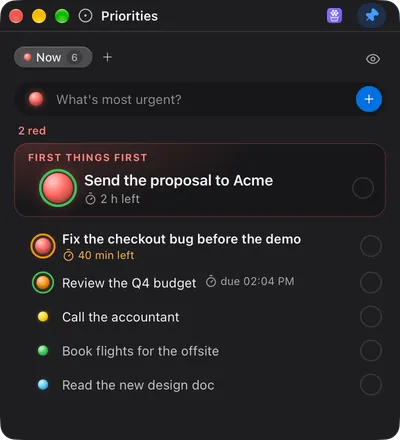
The Priorities widget with a red task on the First things first card, a deadline ring with 2 hours left and tasks in orange, yellow, green and light blue
5 colorsRed to light blue
Plain-word deadlines"by 5", "in 3h"
It ringsWith snooze and Done
Several listsWork, home, launch…
How it works

The color is the priority.

Every task gets one of five colors: red, orange, yellow, green and light blue. Red goes first, and if the first open task is red it sits on a big First things first card at the top. Click a ball to change its color, or start a task with ! for red and ? for light blue.

  • Drag to reorder; drop a task among another color and it takes that color
  • Several lists, one tab each
  • Check it off and it moves out of the way
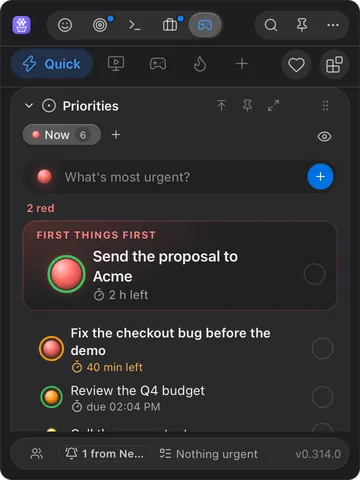
The Toolbox panel open from the menu bar, with Priorities first in the Quick tab
Deadlines that ring

A ring that empties as time runs out.

Give a task a deadline and a ring appears around its color. It empties from the moment you set it until it is due: green, then amber in the last hour, then red in the last fifteen minutes. Under three hours left, the row counts down («2 h 15 min left»); further out, it shows the time.

  • Durations: "in 3 h", "1h30", "45 min"
  • Times: "by 5", "at 17", "17:30"
  • When it is due: a banner that waits, with Snooze and Done
Two red tasks, one with 2 hours left and one with 40 minutes left, with their deadline rings
Always in sight

Pin it, give it its own icon, or cover it.

With the 📌 it floats in its own window, above everything, and comes back after a restart. With the ↑ it gets its own icon in the menu bar: one click and it drops down, like a separate little app. And if something red or overdue is waiting when you turn the computer on, it opens by itself.

Sharing your screen? The eye button turns on presentation mode: tasks show as dots, the same way Quick Note covers a note.
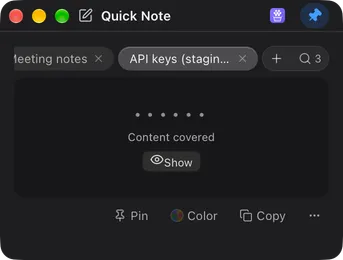
A covered note in Quick Note: dots instead of the text and a Show button
Part of Webstarted Toolbox

It’s one widget of many.

Priorities lives in the Quick tab of Webstarted Toolbox, next to the to-do list and the Timer. AI agents connected through the MCP server can list, add and check off priorities too.

Want something warmer than dark gray? Try the Paper theme: cream dotted paper, sticker tabs and cut-out cards.

FAQ

Questions, answered.

How is this different from a to-do list?

A to-do list holds everything you have to do someday. Priorities holds only what matters right now, sorted by color, with the most urgent task on a big card at the top. Toolbox has a to-do list too: the two live side by side and do not replace each other.

How do I set a deadline?

Type it at the end of the task: "call Ana by 5", "send the deck in 3h", "review 17:30". Or use the timer button on the row: in 1 hour, in 3 hours, today at 6 p.m., or a time you pick. A loose number is not a time, so "buy 2" stays a task.

What happens when a deadline is due?

It rings like a timer: a banner that waits for you, with Snooze (15 minutes, 1 hour, 3 hours or tomorrow) and Done. The ring around the task turns red and the row says how long ago it was due.

Can I share my screen without showing my tasks?

Yes. The eye button turns on presentation mode: every task shows as dots, and the alert that rings says a deadline is due without the text. It is the same presentation mode as the rest of the app.

Is it free?

Yes. Priorities is one of the widgets built into Webstarted Toolbox, which is free to download and use, with no account.

Get Webstarted Toolbox

Free to use. Priorities and every other widget included. macOS 12+ and Windows 10+.

Free beta · macOS · Windows (x64) · Signed & notarized · No account required
Keep exploring

One icon, many small tools

This is one of the 51 widgets in Webstarted Toolbox, the free all-in-one menu bar app for Mac and Windows. Here are the rest:

☕ Keep Awake Stop your Mac from sleeping, on your terms. 📊 LLM Quota Pace your Claude / AI usage against the clock. ⏱️ Timer Drag a ring dial and get an alert you cannot miss. 🍅 Pomodoro 25/5 focus cycles in your menu bar. ⏳ Countdown Live countdowns to anything that matters. ☰ Clipboard history Your recent copies, one keystroke away. {} Dev tools JSON, JWT, Base64, regex, epoch and 6 more, offline. ✎ Quick Note A scratchpad that autosaves as you type. 🌐 My IP Your public IPv4 and IPv6, copyable, with ISP and location. 📈 System Info CPU, memory and GPU in your menu bar. 🐹 Topos A 30-second reflex game in your menu bar. 💣 Minesweeper Classic minesweeper in your menu bar. 🪙 Crypto Prices Live crypto prices with 24h change, in your menu bar. 💱 Currency Converter Convert currencies with real parallel rates (blue, MEP, CCL). 🌍 World Clocks Several cities' time at once — daylight saving handled automatically. 🔳 QR Generator QR codes for text, URLs, WiFi or contacts — offline. 🔑 Password Generator Strong passwords & passphrases, fully offline. 🌤️ Weather Any city, now + the days ahead — no API key. 🔥 Habit Tracker Daily streaks — don't break the chain. 100% local. 🔤 Text Tools Change case, slugify, count, dedupe — offline. 🎲 Random Picker Pick from a list at random, or roll dice. 🎨 Color Picker Pick a color, copy hex / rgb / hsl / hsv — offline. 🌐 Translator 18 languages from the menu bar — no API key needed. 🔀 Text Diff Compare two texts line by line — 100% local. ⏰ Cron Wizard Cron expressions in plain English, with the next runs. 🗃️ Dummy Data Lorem ipsum and fake rows in JSON, CSV or SQL. 🔊 Focus Sounds White, pink or brown noise — synthesized, no files. 🔁 Subscriptions What your recurring services cost per month and year. 🧾 Rates & Tax Hourly ↔ yearly, and add or extract tax. ⛽ Network Fees Ethereum gas and Bitcoin fees, right now. 📣 UTM Builder Trackable campaign links, normalized so GA behaves. 🌿 Git Status Which of your repos are dirty, unpushed or behind. 🧮 Calculator Type the calculation, read the result as you go. 🎬 Teleprompter Your script scrolls at the speed you read — in wpm. 📊 Stocks Stocks and ETFs with the day’s change — no API key. 🔥 Fireplace A fireplace generated on the fly — no files, no network. 💼 Job Tracker Your applications, with an OS alarm before each interview. ⇄ Converter 57 units in 8 categories, converted with zero network. ⏰ Alarms Clock-time alarms that ring with everything closed. 🗂️ Project Boards Kanban boards with your columns, and a due date that notifies you. 📡 Website Monitor Are your sites up? The code and the latency, from your machine. 📤 Send to another computer Text, images and files to another computer on your network. 📝 Markdown A Markdown editor with live preview, in your menu bar. 📚 Library Your snippets and prompts in folders, one search away. 💽 Folder Scan See which folders are eating your disk. 📅 Calendar A day planner in your menu bar, with nothing to connect. ✅ Tasks A menu bar to-do list whose times actually ring. ☑️ Checklists Reusable checklists from templates: reset, rerun, export. 🎤 Presenter A talk clock that knows your script, not a stopwatch. ✏️ Pencil Draw on your screen, over everything, while you present.